
Creating personal branding through a handwritten mark is less about imitation and more about recognizable identity. A signature font generator converts a name into flowing styles, giving social profiles, emails, and bios a personal finish.
From my practical testing, copy-paste Unicode is useful for quick identity experiments, while a downloaded font file suits controlled layouts. Choosing cursive, italic, or bold styling depends on legibility, platform, and the intended professional context.
Table of Contents
What Is A Signature Font Generator
A signature font generator can transform a type name into script text, then let you compare 74 styles, curves, and serif details without manual design work, creating a distinct handwritten impression for modern branding today.
In practice, I find the useful test is not realism alone; it is whether the generated lettering remains readable across device, email closing, profile, and transparent PNG workflows without losing its intended character in use.
How To Use It
After entering your typed name, inspect the signature font generator preview and available pick font options. From experience, testing several styles first reveals differences in readability, spacing, and character balance before settling on a design.
Next, test the chosen cleaner style in an email signature, social media bio, and digital document. If rendering changes, try a simpler script, compare device support, then keep a matching style for consistent professional use.
Why Use This Generator
Use this generator when ordinary lettering feels too generic. I often see creators need custom lettering, a stronger personal touch, and practical creative branding for profiles, invitations, portfolios, and email identities without installing specialized software.
From my experience, the biggest benefit is controlled presentation: choose a script signature, test Unicode rendering, compare professional styles, then copy-paste text into your professional email signature or profile text across platforms while keeping readability.
Where To Use
Signature fonts fit naturally into email sign-off areas, social bio profiles, profile heading sections, website headers, and signature font for logo projects, especially when a casual signature or professional use needs a polished visual identity.
I also use them for wedding invitation drafts, personal letter layouts, sales letter designs, e-book covers, digital signature graphics, and commercial use branding, while keeping elegant script readable across each destination without sacrificing character consistency.
Categories
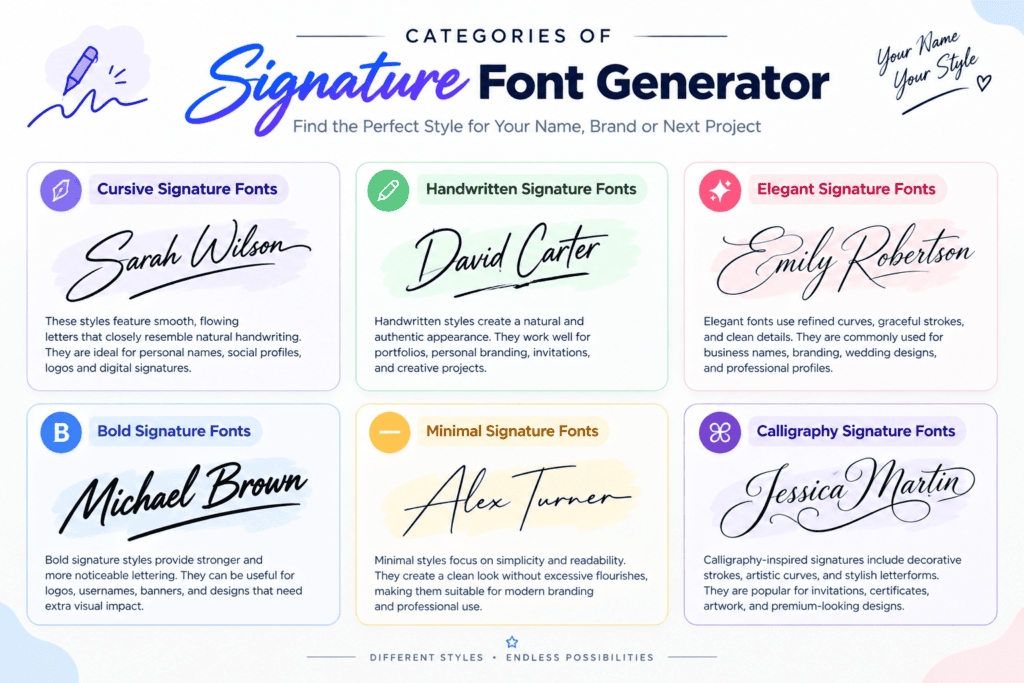
Signature font categories become clearer when you examine where style fits: professionalism, portfolio, resume, event invitation, watermark concept, or gamer tag. I usually group choices by purpose before judging appearance, readability, and personality first, carefully.
For work, HTML signature, logo concept, wordmark, maker mark, photography watermark, and creator handle need treatments. For personal projects, wedding invitation, dedication line, custom gift, and tattoo reference can favor decorative character and expressive strokes.
Tips For Better
Better signature text starts with restraint: choose a graceful cursive signature font, then test spacing, readable text, and overall presence before exporting. I usually compare styles at normal viewing size to avoid visual clutter online.
For names with letters, a longer name often needs a refined italic signature text rather than heavy decoration. Use one supporting text element at most, keep symbols restrained, and check device rendering through mobile browser.
Signature Fonts Vs. Real/Legal Signatures
A signature font can create a polished visual identity, but it is not automatically a legal signing tool. I routinely recommend treating generated text as presentation material, especially beside an official document or financial document.
For real transactions, the signer usually follows the required signature method, identity checks, and organization requirement. A visual generator produces appearance only; its output may be not legally binding, even when it closely resembles handwriting.
Also Read: Arial Font Generator
Conclusion
A practical signature font workflow balances personalization, modern style, and professional text signature quality, keeping each handwritten name style usable across digital documents, profiles, correspondence, and copy and paste, and still preserving a polished presentation.
From my experience, results come when users treat Unicode text as a design choice, test device rendering, and keep legal boundaries visible; polished output should support brand alignment while staying practical for real-world use consistently.
Is It Free To Use?
The generator is 100% free, requiring no hidden fees and no account. Choose curated fonts, create a ready-to-use signature, then copy your result without installation for testing names and branding without paying or signing up.
Do I Need To Install Anything?
No installation is required: this browser-based tool lets you type a name, preview a signature, compare styles, and copy the result instantly. I prefer this approach because it keeps setup simple and supports mobile workflows.
How Do I Copy/Use The Signature Elsewhere (Email, Instagram, Etc.)?
After generating your signature, I rely on copy-paste portability to move it into an email, Instagram bio, profile, or post; the destination app may render Unicode differently, so I check spacing and appearance before publishing.
Is This A Legally Binding / Real Signature?
A signature font can resemble a real signature, but it does not automatically create a legally binding signature. For a contract, identity confirmation, and approval, use the required official signing process rather than text alone.
What’s The Difference Between A Signature Font And A Regular Font?
Signature fonts imitate handwriting, combining a handwritten signature appearance with expressive details, while regular fonts emphasize consistency and readability. In practice, a professional signature font adds personality; a standard typeface supports clearer, predictable communication today.
1 thought on “Signature Font Generator – Turn Your Name Into a Stylish Signature”