
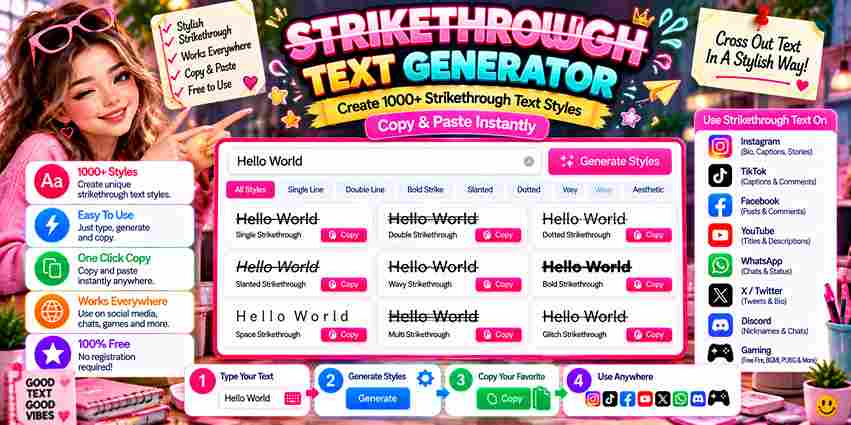
Unicode Strikethrough Generator
Type your text below to generate copy-pasteable styles for Discord, WhatsApp, and social media.
Most people first notice crossed-out text appearing on Facebook or Twitter and wonder how it’s done. The answer lies in special Unicode characters that place a horizontal line overlay through each character across digital formats.
The Slash Text Tool removes every technical barrier. You enter text, choose a strikethrough style, and the output is ready to copy, then pasted across platforms — from Instagram posts to emails, blogs, or WhatsApp messages.
Table of Contents
What Is Strikethrough / Slash Text?
Strikethrough text sits among the most distinctive text decoration formats where a specific character — Unicode \u0336 — is overlaid across each letter, marking it as crossed-out, deleted, or corrected text without changing the underlying plain text.
Unlike styled HTML, a slashed text generator smartly uses Unicode characters to produce visually striking phrases and paragraphs across apps, social media posts, and instant messaging, giving content creators a free and versatile creative flair.
How Does It Work?
Formatted text on any platform doesn’t just change fonts—special Unicode characters actually replace each character. The Slash Text Tool lets you type or paste into the input field, automatically changing normal text in seconds.
Unicode formatting maps each letter to obscure characters with special codes. The Output textbox displays your crossed-out appearance, ready to copy to clipboard and share across any social media or messaging app without HTML restrictions.
How to Use / Step-by-Step Guide
Drop your content into the text input on the Strikethrough Text Generator, pick a style, and the slash tool delivers your styled text instantly — already formatted and ready to paste or display with total ease.
The result is a unique mix of slashes, underlines, and effects that stay compatible across platforms. Simply copy and convert the text anywhere to emphasize specific words or cross out anything that no longer fits.
Available Styles
The tool provides multiple styles for every creative need. From Long Stroke to Short Stroke, each strikethrough style creates a distinct visual style. Options like Cursive Text, Bold, and dotted line make formatting truly intuitive.
Curved strikeout lines add personality while Italics Text and wave line effects bring creative energy. Each unique option supports emphasis and tone, letting casual users and professionals experiment freely with Unicode text across any platform.
Why Use This Tool?
Editing documents, chats, and Facebook posts with strikethrough once demanded Microsoft Word or those clunky plugins. This online tool lets you quickly create crossed out text that’s cool, easily visible across any device — no downloads.
Beyond correction, this tool serves creative writing, professional content, and humor alike. Select italic, bold, or unique styles to transform notes, drafts, even Instagram bios — making each stand out with eye-catching effect and creative touch.
Where Is Strikethrough Text Used?
Social media platforms like Facebook, Twitter, and Instagram rely on strikethrough text for creative styles. Writers use line through text to show corrections, making inputted text visually appealing while retaining the original for human eyes.
Tweets and fun edits often rely on unique effects the strikethrough effect creates. It signals deletion or sarcasm without erasing content. Formatting tools support combining bold text with slashes, making posts distinctive on any browser.
Slashed Text Example
Observing a digital hello altered via striking overlays reveals psychological friction. When you share messages, friends immediately notice this unique look disrupting standard reading patterns, proving that typographic destruction heavily deepens human text data engagement.
Consider retail pricing dynamics where crossing out $999 to display $599 creates instant urgency. This uncommon visual execution remains highly playful yet disruptive, forcing modern consumers to reconstruct historical value metrics through strategic text formatting.
How to Strikethrough Text in Word
In any desktop document, achieving clean layouts requires intentional choices. Practitioners tracking edits manually bypass the standard Strikethrough button interface entirely. Instead, they highlight the selected text block to apply a native format change instantly.
This architecture mirrors how Microsoft Word processes typography internally. Unlike modern Docs platforms where a clean line through rendering feels secondary, legacy desktop software embeds this specific strikeout style deeply within localized layout engines perfectly.
How Do I Type Strikethrough Text Online Without MS Word?
Practitioners bypass desktop software entirely. We leverage Unicode browser environments to instantly manipulate web typography. This digital method achieves seamless text effects, bypassing local installations to convert standard strings into universally accessible cloud layout ecosystems.
Will Crossed-Out Text Work on Instagram, WhatsApp, or Facebook?
Deploying customized styling inside a social media post triggers rendering glitches. Our testing shows Platform Compatibility fluctuates wildly because each app always processes unique unicode differently, sometimes completely breaking the expected layout and visual appearance.
Can I Combine Strikethrough With Bold Or Italic?
In my experience, combining bolded and italicized aesthetics with a single line enhances your visual impact. By stacking unicode modifiers properly, any computer translates these cursive combinations accurately, offering unique typographic style for all readers.
Why Doesn’t the Text with a Line Through It Appear Correctly?
Systems often misread complex data when apps strip special Unicode combining characters entirely. This rendering failure happens because platforms lack native support for these unique character codes, causing the struck line to glitch or disappear.
Is Strikethrough Text Readable by Screen Readers?
Screen readers completely ignore assistive strike-through text styling because raw Unicode symbols mask the core meaning. Auditory devices fail to read this hidden importance aloud, leaving blind users totally oblivious to ongoing platform CSS revisions.