
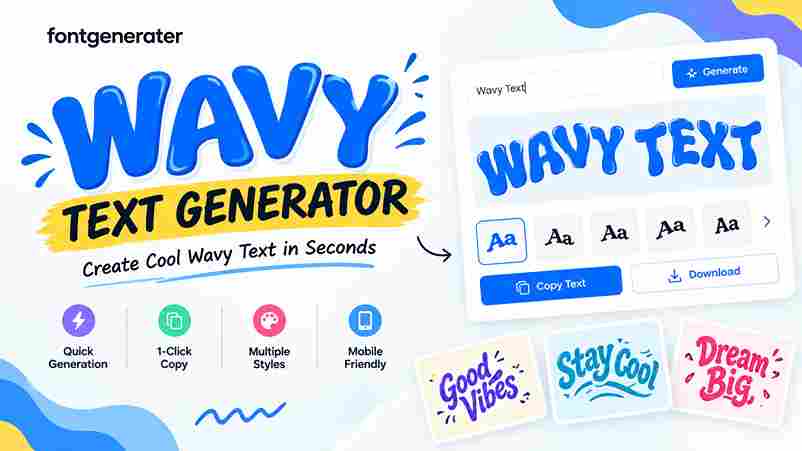
Wavy Text Generator
A wavy font generator turns regular text into expressive typography, giving messages a dynamic look without installing font files. In practice, I find Unicode characters especially useful because they create flexible styling for digital projects.
For creators, a playful wavy treatment can add movement to TikTok captions and graphics while keeping copying simple. The generator instantly transforms typed characters into decorative styles, helping creative designs feel distinctive across modern platforms.
Table of Contents
What Is A Wavy [Text/Font] Generator?
A wavy text generator is an online tool that changes ordinary writing into visually appealing characters using a flowing double tilde accent, giving each character a gentle ocean-like motion without creating an image with ease.
Its practical value comes from styling: enter a phrase, inspect the result, then copy it for social media content, headings, or relaxed content when a chill wiggly font appearance suits the message on platforms today.
Also Read: Stacked Text Generator – Copy & Paste Stylish Text
How To Create/Use Wavy Text
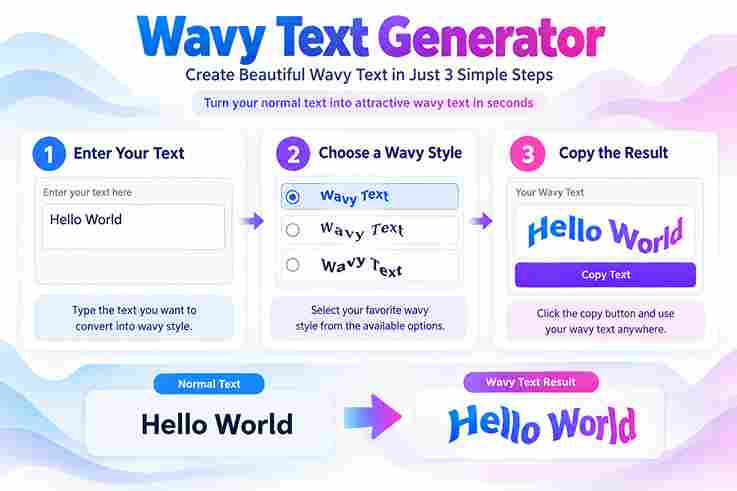
In my testing, type the phrase into the online tool, choose the double-tilde wavy styling, and preview it. Keep wording short; Combining Double Tilde marks may shift with platform rendering, affecting letter spacing before publishing.
Then copy and paste the finished key phrases into Instagram, Discord, or another text field. Check the appearance on mobile devices, adjust the font or style, and download the version that stays clear everywhere visually.
Where / When To Use Wavy Text
Wavy text fits social captions, gaming names, stories, and promotional graphics when ordinary typography feels rigid. I often use a wave-like pattern for memorable branding, especially where a dreamy effect adds personality without overwhelming messages.
Use it on Instagram bios, Discord names, or Spotify playlist descriptions when you want accents that remain readable. Layouts transparent background and draw curved text options help upload image posts, while business slides need restraint.
Wavy Text Generator Features
The strongest feature is controlled styling: users type or paste text, choose double tilde accents, and instantly produce wavy font styles with no downloads. The copy button keeps the finished result practical for everyday publishing.
In my testing, useful flexibility comes from standard Unicode support, 100% mobile-friendly output, and styling that remains visually appealing across Instagram, Discord, and other platforms. Features also cover letters and digits, giving creators broader control.
To Make Your Stories, Videos & Presentations Shine
Professional creators can turn slides into lively visual moments by giving titles a wavy effect that feels subtle yet evocative. In my experience, this treatment works especially well when presenting flowing motion without distracting viewers.
For stories and videos, overlays can carry a beach vibes mood, while presentation headings gain personality through dreamy styles. Keep the treatment concise, because decoration can compete with images, charts, and speaker messaging on screen.
Flowing Ocean Vibes With The Wavy Text Generator
I often shape Ocean moods with waves, letting surf language guide the rhythm. A short phrase can feel dreamy when Flow is controlled carefully, giving coastal typography a relaxed presence across modern social profiles today.
For beach posts, I pair wavy lettering with chill spacing and soft styling. The result adds movement without animation, creating visual energy that suits captions, headers, playlists, and coastal designs for relaxed beach branding today.
Flowing Wavy Text Phrases Ready To Copy
From my own testing, ready-to-copy lines stay strongest when compact: “ride the wave” suits relaxed posts, while “Stay Cool” works for casual profiles. Copy-paste functionality keeps experiments fast, and creative style adds personality without clutter.
I often pair “ocean-like aesthetic” wording with surf content, then check how the Unicode combining character renders on phones. A dependable phrase should feel distinctive yet readable, especially when repeated across profiles, captions, and designs.
Double The Marks
When I test wavy text, combining tilde characters create a clearer visual rhythm than heavy decoration. Adjusting different heights introduces subtle variation, while the result remains readable across short labels, captions, and usernames daily today.
For polished styling, a wide tilde can offer a suggestion of motion without overwhelming letters. I usually keep spacing controlled, because the wavy treatment should support the message rather than become the message itself visually.
Double The Restraint
Most designs improve when creators keep it short. Using 1-6 words can carry enough impact, while full paragraphs become visually tiring, especially when each letterform receives decorative marks. Restraint keeps wavy text useful online today.
In my practical testing, lowercase text often pairs well with soft aesthetics and muted color schemes. That combination keeps decoration balanced, helping a wavy phrase feel intentional across profiles, headers, and casual social posts daily.
Wavy Accent Styling Tips And Technical Notes
On real projects, I keep wavy accents restrained: check single combining mark behavior, inspect word boundaries, and test modern systems before publishing. This avoids inconsistent rendering while preserving a clean ripple aesthetic across interfaces consistently.
From experience, I also test paired spans against the Separator choices, because decorative marks can collide when styles change. Keep accents lightweight, verify copy behavior, and compare display results on each target platform before release carefully.
More Flowing And Aesthetic Typography Styles
More flowing typography comes from balancing wavy curves with readable spacing, not simply adding decoration. I often pair flowing characters, gentle motion, and a restrained wavy accent to create movement that remains practical for captions.
For stronger visual variety, experiment with arc text, circular text, and a subtle outline, then test the result across social media, gaming profiles, and website headers. This creates distinctive styles without sacrificing readability or balance.
Why Choose Text To Font?
I choose text-to-font tools when speed and control matter: they let me customize styles instantly, test eye-catching wavy fonts, and keep creativity moving without installation. For projects, free access and no signup remove friction.
In practice, this approach suits gaming, lo-fi aesthetics, and social media bios because stylized lettering adds personality without rebuilding artwork. I also find it useful for design elements, where a subtle wavy treatment creates distinction.
Start Creating Wavy Fonts Now!
Start with a short phrase in the wavy text generator, then test spacing, letter balance, and accent density before publishing. I usually check readability first, ensuring flowing styling stays clear across real platform displays consistently.
Once the movement feels right, explore a fresh twist with wavy font choices, then paste the result into captions, digital art, or relaxed content. A restrained treatment often creates more impact than decoration alone everywhere.
Is It Free?
Yes, the generator can be used as a free online tool without installing software. I regularly test similar tools, and the useful advantage is quick access: create wavy text, copy it, and continue designing immediately.
Does It Work On Mobile / All Platforms?
Yes, wavy text often works everywhere on mobile because Unicode characters render as ordinary text across browsers and apps. I’ve tested this approach on phones, tablets, and desktops; compatibility mainly depends on the platform’s support.
What Is Wavy Text / A Wavy Text Generator?
A wavy text generator transforms normal text into w͠a͠v͠y͠ flowing characters by adding double tilde accents, creating gentle motion and relaxed aesthetics without complex setup. The result feels stylish while keeping content clear and consistent.
Where Can I Use Wavy Text?
I use wavy text for YouTube thumbnails, engaging presentations, and memorable branding, where a dynamic style adds visual energy. It also suits dreamy Instagram bios, TikTok, Discord usernames, music, and relaxed social posts without crowding layouts.
Can I Put Wavy Text Over Images?
Yes, draw over image projects begin with an upload; then add wavy text through templates or special effects. I often save .png exports for stories, keeping the flowing accent readable on all platforms without distortion.
3 thoughts on “Wavy Text Generator – Generate Cool Text Effects”