

Repeat Text Generator
Instantly repeat text with custom separators, indexing, & formatting
A free online tool can turn a word, sentence, or emoji into repeated text instantly, giving users full control over the repeat count, separator, and output. It works as copy-paste utility for everyday tasks, simply.
WhatsApp and social media captions work with text repeater handling repeated phrases without manually copying and pasting. Users choose a specific number of times, keep text on the same line, or create a new line.
Table of Contents
What Is A Text Repeater?
A text repeater is an online tool that creates repeats from supplied wording. It may process a symbol, phrase, or invisible character, producing multiple copies while keeping the original input unchanged for quick reuse efficiently.
Instead of manual copy and paste, you set a chosen number of times and let the generator build output automatically. I find this useful for test strings, decorative messages, examples, and repetitive social content quickly.
Also Read: 3D Font Generator – Create Stunning 3D Text Online
How To Use The Text Repeater
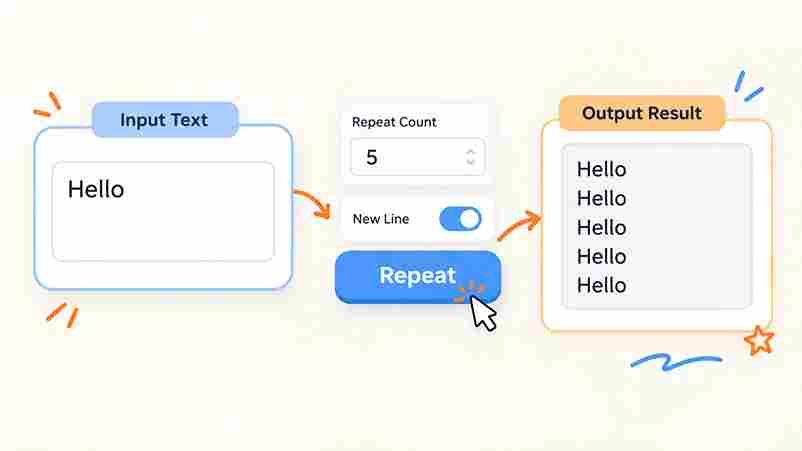
Start by typing your phrase into the input field, then choose a repeat times value. Adjust the option for separators, select New line mode, and preview the resulting repeated output before copying to your device.
For quick work, use 100 preset or a custom number of repetitions, add spaces or hyphens, and test the result with copy text. I usually review formatting first, especially for social posts before final sharing.
Features / Why Choose This Repeat Text Generator
From my testing, strong features include no usage limits, multiple languages, and processed locally handling. Enter an input string, set repeat times, select separators, then review the output field instantly, quickly, and safely during testing.
I prefer an online tool: no signup, no email, and no account needed remove friction. Its browser workflow supports any device, while Add New Line option, Add Space option, and download make repeated content practical.
Download Repeated Text
After generating repeated output, use download text to save the result as a .txt file rather than keeping everything in the browser. The file preserves spacing, separators, line breaks, and repeated content for later editing.
On desktop or mobile, choose the file, then keep it in local storage for reuse. I usually save longer repetitions this way because it avoids accidental refreshes and makes sharing the finished text much easier.
Copy Text To Clipboard
After you generate repeated text, I usually use one-click copy rather than selecting lines manually. The clipboard keeps the generated result ready immediately, making copy-paste content practical for captions, messages, testing, or edits across apps.
On mobile or desktop, the workflow feels when output stats are checked first, then copied in one action. For large blocks, I prefer previewing size before pasting, especially with browser limits on websites and forms.
Define The Number Of Repetitions And Separators
Set the Number of Text Repeats before judging the final layout. A custom repeat count lets you control volume, while choosing a Separator determines whether repeated phrases appear tightly together or visibly divided for clarity.
In practice, I compare a comma, spaces, and new lines against the intended platform. Asking how many times the phrase should repeat, then using Add text between repetitions, keeps copied results orderly and manageable.
Add New Line And Add Space Settings
I usually choose Add new line when one per line makes generated results easier to scan; each line break keeps entries distinct, and empty lines can separate groups when a large result needs clearer layout.
For shorter results, I enable Add space only when separation improves readability. Testing whitespace first helps, while no space creates tighter content. A custom separator is useful when generated entries need consistent boundaries every time.
Upload File Directly From Local Storage
The upload file option lets you bring text file content into the input field, avoiding copy and paste when handling larger blocks. This helps process QA strings, large text datasets, and phrases stored on device.
After selecting a local file, the generator reads original text and applies a custom separator setting. This approach reduces errors, preserves formatting, and keeps preparation practical when the source contains material ready for repeated output.
Word Count
Word repeater tools can compare words across outputs, making number of repetitions useful for checking size. I often review estimates result size before choosing 100 times or 1000 repeats, especially during careful structured text preparation.
An output mode can also separate repetitions through line-by-line message formatting, which makes inspection clearer. For form testing, I use input limit testing to see whether repeated content reaches practical boundaries without confusing the wording.
Multiple Languages Supported
A repeat text generator can handle multiple languages when its input accepts Unicode text, preserving letters, symbols, accents, and scripts with no software. This makes repeated content practical for multilingual messages, testing, and social media.
In testing, language support matters when text includes Arabic, Urdu, Hindi, Bengali, or emoji strings. Output preserves spacing, avoids broken characters, and lets users copy results for chat app messaging, Instagram captions, and gaming profiles.
No Download Required
A no download workflow keeps repeated text accessible in the browser, reducing temporary storage needs while supporting social media formatting, quick testing, and routine copy-pasting tasks across desktop or mobile devices without installation or delays.
From my experience, this approach works well when the goal is simple: open the tool, enter text, repeat it, and copy results immediately, with no signup, a free workflow, and no software installation or updates.
No Account Needed
No account is needed to use the repeater, so users can enter text in the input field, choose repetitions, and generate results instantly. This no signup workflow keeps UI testing simple, focused, and convenient daily.
The tool requires no registration, making repeated text practical for social posts and development checks while keeping input private and avoiding account creation. From one phrase to thousands of repetitions, access stays straightforward, flexible today.
Completely Private
Privacy is straightforward here: your input stays in the browser rather than being sent to a server, so repeated text can be generated locally without turning ordinary writing into stored test data for processing later.
In my own workflow, this is useful for social captions, messaging, or development checks, because I can repeat material, verify formatting, and clear it afterward without creating an unnecessary account or upload step at all.
Who Uses This / Common Use Cases
People use a repeat text generator when manual duplication becomes tedious: social media posts, text messages, phone messages, Reminder notes, birthday greeting drafts, and templates can be prepared consistently, reducing repetitive typing and saving time.
I often see creators use it for Instagram, Twitter, and messaging apps, while testers generate QA long string samples or form-testing strings. Others repeat emoji content for playful posts or compact profile formatting during tasks.
Limits And Safe Use
Repeat text tools become safer when users set a custom separator, preview outputs, and avoid excessive repetition. For routine testing, a compact repeated text sample is enough; thousands of copies can create overflow and clutter.
On social platforms, repetitive content patterns may attract unwanted attention, while harmless internet humor can annoy a friend. I prefer use: validate layouts, test form limits, compare settings, and keep repeated outputs proportionate for testing.
Repeat A Word 100 Times With This Text Generator
To repeat a word 100 times, enter it once and choose 100 preset repetitions. The generator creates repeated copies instantly, letting you copy and paste the result without copy-pasting by hand online today easily quickly.
For quick greetings or playful Happy Birthdays messages, a text repeater handles phrases at scale. I often use 10 times for testing, while 1000 times works better for bulk patterns, demonstrations, and controlled experiments reliably.
Popular Text Repeater Examples
Popular examples include emoji presets such as hearts, fire, and stars, plus lol 😂 or Sorry 🙏. emoji reactions can be repeated for social posts, jokes, TikTok bios, profile decoration, or testing, depending on context.
A useful example is repeating short phrases for gaming profiles, Instagram captions, Twitter posts, or dividers. Longer outputs should remain purposeful, because repetition works best when the intended visual or communication effect remains immediately understandable.
Separator Comparison
Separator choice changes readability and copy behavior. custom separators let repeated text use a space, comma, semicolon, period, or hyphen; newline formatting produces cleaner blocks, while invisible separator options suit specialized invisible text workflows clearly.
Same Line, New Line, And Custom Separator Examples
I compare separators by purpose rather than appearance. A same line format is compact, different lines improve scanning, and numbered list output adds structure. For dense repeated messages, reducing clutter matters more than maximizing repetition.
A practical separator test is to generate the phrase with four output modes, then inspect mobile browsers, copying behavior, and visible gaps. spaces may look simple, while blank Unicode character methods behave differently across platforms.
How Do I Repeat Text Online?
Type your wording into the input box, choose Repeat Times, use select all when finished, then press the generate repeat text button. I check the preview before copying, especially for spacing, separators, and accidental duplicates.
How Do I Repeat Text 100 Times?
For 100 repetitions, enter your phrase, select 100, and review the text repeated before copying. I prefer copy all after checking spacing and separators, because formatting differences become noticeable across longer outputs during practical use.
Can I Repeat Text 1000 Times?
Yes, repeat text 1000 times is practical for testing, formatting, and bulk text tasks. Use a safe output cap when outputs become large, and reduce the count when your browser or target app becomes sluggish.
Can I Repeat Text On New Lines?
Yes, a repeater can place newly repeated text on separate lines, making each result easier to scan. In practice, I use blank lines selectively when generating multiple copies, especially for lists, testing, and formatted messages.
Can I Add Each Repeated Text On A New Line?
Each repetition can also appear on a fresh line through the Repeat Text button, then copy all results together. This approach keeps numbers aligned, prevents clutter, and makes outputs easier to edit, verify, or paste.
2 thoughts on “Repeat Text Generator – Copy & Repeat Text Easily”