
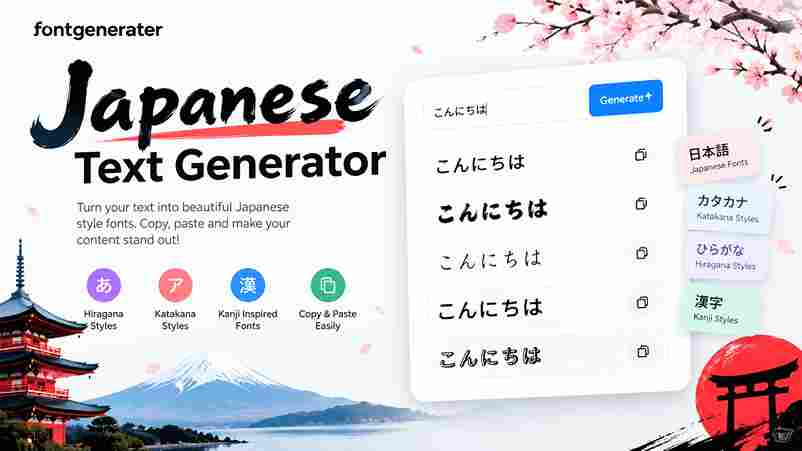
Create stylish Japanese-inspired text, explore real Japanese examples, and copy your favorite result.
Japanese Text Styles
8 stylesJapanese Text Examples to Copy
Explore real Japanese writing and copy an example into the generator.
A Japanese Font Style Generator turns input into Japanese-style symbols, helping creators test visual moods before publishing. It changes appearance, not meaning, so decorative output should never be mistaken for actual Japanese translation of words.
Experiment with hiragana, Katakana, and kanji-inspired lookalikes, then compare font previews across background options. For trustworthy communication, keep original wording clear and use real Japanese writing when accuracy matters for real-world public signs and menus.
Table of Contents
How To Use The Japanese Font Style Generator
Start by entering a name or phrase into the text field, then inspect the preview area before choosing from the Japanese Font Styles. Compare letter spacing at different sizes before using the result on phones.
For a controlled result, Select a Font, use Enter Font Size, and choose Select a Color before pressing Generate. Check whether thin strokes remain legible, then repeat with a shorter phrase if spacing feels crowded.
Create Japanese Text Styles
Create Japanese text styles by entering a phrase, then exploring decorative character sets, full-width text, and katakana-style characters. The online text generator changes appearance, so carefully check each result before copying it into your design.
For contrast, test Gradient-V, Shadow-S, or Sumi Dark, and adjust ink color against the background. In practice, compare the preview carefully at small sizes; some Unicode characters vary across devices, so choose a legible style.
Japanese Fonts (Tool Instructions)
Enter your sample in the input box, then compare the result before choosing a look. Adjust the text color and font size to check legibility across typical profiles, banners, and compact layouts on different screens.
Keep live updates active while testing alternatives; the no refresh workflow makes comparisons smoother. Review Japanese fonts per page, and consult the font family page for more detail before saving the final result for sharing.
Customize The Display
A polished preview depends less on decoration than on balance: choose Select a Fill first, then test colors against your background. Keep letters readable before adding any stronger effect across common screen sizes and devices.
Use Select an Outline to define edges, then compare Gradient-H with Shadow-L rather than stacking every option. In practice, apply text effects sparingly; this often gives Japanese-inspired lettering clearer hierarchy and cleaner output for sharing.
Copy Or Download The Results
After previewing your result, choose normal download or prepare Japanese text as an image when your design must preserve its look across platforms, especially when characters render inconsistently on many mobile devices and older browsers.
For selectable characters, use copy and paste instead, then place them in a post or message. Check transparent backgrounds before publishing designs, since a saved picture and editable text behave differently across apps and platforms.
Where To Use Your Japanese Font Creations
Use your Japanese text generator creations in social media posts, a polished profile, or a Discord nickname to establish a consistent visual mood. Test each style at small sizes before publishing across platforms and devices.
For visual projects, try cosplay pages, vaporwave edits, thumbnails, graphics, or presentations. A transparent image can help with layering, but preview contrast and character support first; decorative lettering may not translate Japanese meaning by itself.
Suitable For Various Profiles
For anime fans, chosen labels and themed captions can feature Japanese-inspired styles. Creators can test distinctive lettering for recognizable posts. Choose readable characters so visitors understand your identity across platforms and screens consistently on phones.
For brand projects, marketers and designers can compare decorative headings, hoodie graphics, and poster concepts before publishing. The generator suits different users, but preview each result on target devices because uncommon symbols may render inconsistently.
When To Use Japanese Text
Use Japanese text when a profile needs a distinct aesthetic, a gaming identity needs flair, or a caption should stand apart. These decorative characters change appearance, not meaning, so choose them for short online labels.
Try it for an Instagram Bio, Discord identity, channel name, or visual design mockup; keep essential information readable. If readers must understand a message, use standard language or a reliable translator instead of styling alone.
Where The Characters Come From / Unicode
A Japanese text generator may imitate CJK ideographs, but visual resemblance does not make its output Japanese. Understanding real writing systems helps users separate designed decoration from text that carries language-specific meaning clearly within profiles.
For Japanese culture, check whether a style uses real characters or a borrowed look from symbols. Some alphabets may be arranged decoratively into blocks, while a Latin letter remains Latin rather than becoming Japanese visually.
Where The Characters Come From, And Why That Matters
Many decorative results begin with the Latin alphabet, then use the Unicode standard to represent distinct textual characters. This shared text encoding rule set helps text travel between websites, apps, operating systems, and devices reliably.
That origin matters because a Japanese font generator may substitute fancy symbols or stylized English characters, rather than provide authentic Japanese writing. Check meaning before publishing branding for Japanese readers on public pages or profiles.
Also Read: Kanji
Is This Real Japanese?
Usually, this generator is a styling tool, not a translation service: it changes the appearance of text, while the original English wording may remain unchanged, even when the result suggests a Japanese aesthetic to readers.
Check each output before publishing: Japanese-looking characters may be decoration rather than language; their meaning can differ from expectations, so ask a fluent Japanese reader to verify sentences when accuracy matters, especially for important uses.
Tips
Before sharing designs, decide whether you need readable Japanese or a decorative appearance; a generator may change appearance without translating your message, so verify meaning with a trusted translation service for accuracy before publishing online.
For profiles, test each result on your platform before posting; Japanese aesthetics can support the desired look, but decorative combinations aren’t necessarily actual Japanese language. Keep essential names readable for wider audiences online when needed.
Japanese Text Examples To Copy
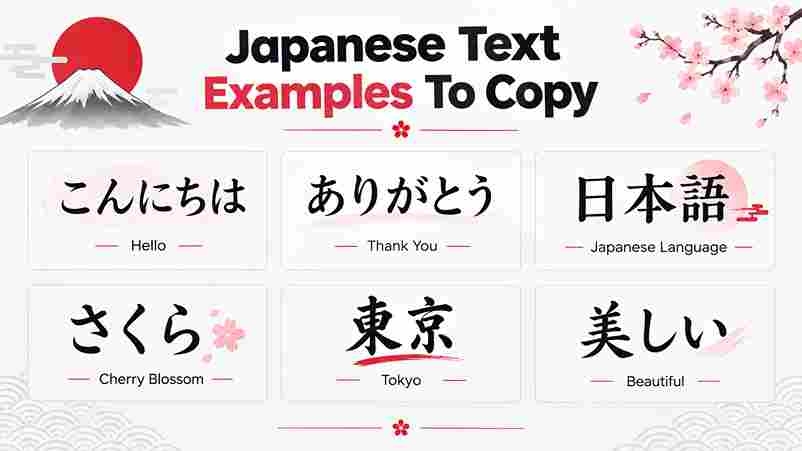
Try short copy-ready samples such as こんにちは, ありがとう, and おはよう, then compare their visual rhythm beside romaji. These familiar greetings are real Japanese expressions, unlike decorative symbols that merely suggest Japanese styling on a screen.
Use loan words sparingly, and treat onomatopoeia as a sound-based option; examples like ドキドキ or ワクワク can add energy, but verify meaning before placing them in usernames or artwork for your intended audience and context.
About Japanese (Writing System)
Japanese writing is not one visual style: Hiragana, Katakana, and Kanji work together, carrying different grammatical and lexical roles. Understanding these Japanese scripts helps designers avoid treating decoration as language rather than genuine meaningful text.
Japanese characters may combine sounds, grammatical cues, or word meanings, so checking context matters more than a font preview. In practical design work, decorative lookalikes should never substitute for accurate text written for real readers.
Conclusion
An effective generator offers more than novelty; it gives Japanese style text fonts for creative design projects without claiming to translate meaning. Test each result carefully, because decoration and language are separate tasks in use.
Keep the output practical: compare calligraphic and angular treatments, check smoother alternatives on phones, and preview names in context. Decorative output works best when readability remains part of the design rather than an accessibility afterthought.
What Is The Japanese Font Generator?
A Japanese Font Style Generator transforms ordinary text into decorative Unicode styles inspired by Japanese typography. It can create aesthetics for profiles and designs, but stylized characters do not necessarily translate English into real Japanese.
Is This Real Japanese Text?
Not every result is genuine Japanese: many Japanese style designs simply reshape familiar letters. Decorative fonts may look appealing, but they do not automatically contain actual Japanese translations or communicate meaningful Japanese language to readers.
Does This Translate My Text Into Japanese?
This generator does not translate by itself: a service such as LibreTranslate must create translated text. An auto-translate feature may refresh it instantly, and the display updates automatically only when that capability is actually enabled.
Is This A Kanji Font Generator?
The main limitation is that only appearance changes: words stay English, styled as Japanese-inspired aesthetic characters. Authentic Japanese requires the correct writing system, characters, readings, and meanings to communicate accurately in everyday situations as well.
What Kinds Of Japanese Scripts Are Supported?
Japanese uses three scripts—hiragana, katakana, and kanji—but this generator mainly offers decorative Unicode character forms inspired by katakana-like shapes and CJK ideographs; it does not convert English into authentic Japanese text by itself.
Can I Type In English?
Yes, type your name or message in English, and the online generator can restyle its characters using Unicode fullwidth or katakana-style designs. These are visual effects, not translations, so check readability before posting anywhere publicly.