

Telegram Font Generator
Create stylish Telegram fonts, fancy text and unique names. Type your text, explore different styles and copy your favorite instantly.
Explore Font Styles
Choose a style and copy your favorite text.
Try another search or select a different category.
Unicode fonts can be copied into Telegram messages, bios and display names. Some characters may look different depending on the device. Bot Formatting options provide MarkdownV2 text for bot/API use.
A memorable Telegram profile rarely needs elaborate decoration. A free tool converts regular letters into stylish Unicode characters, giving your bio, group names, and channel titles a visually distinctive appearance without changing the app itself.
From testing name layouts, I have found that restrained fancy text usually works better than crowded symbols. Try bold or cursive accents, then copy and paste your choice wherever everyday readability matters more than ornamentation.
Table of Contents
What Is a Telegram Font Generator?
A Telegram font generator gives ordinary writing a new look without installing a font file. It converts raw text into stylised counterparts, so distinctive display labels can appear in conversations without changing Telegram’s underlying interface.
Unlike a graphic, the output remains a real text string, with each character assigned a Unicode code point. Rendering across web clients still involves a trade-off, so always inspect decorative selections before publishing them broadly.
How Does It Work? / How to Use It
Rather than installing fonts, start by typing text into a generator and comparing different style texts. From there, pick a style, tap Copy, then paste plain text into your Telegram profile bio on any device.
Unlike native text formatting in chats, a styled display name relies on special characters. In practice, test across clients before sharing; ornate letters may render differently or make names harder for other people to search.
Also Read: Stunning Instagram Fonts to Stand OutWhat Are the Font Styles for Telegram?
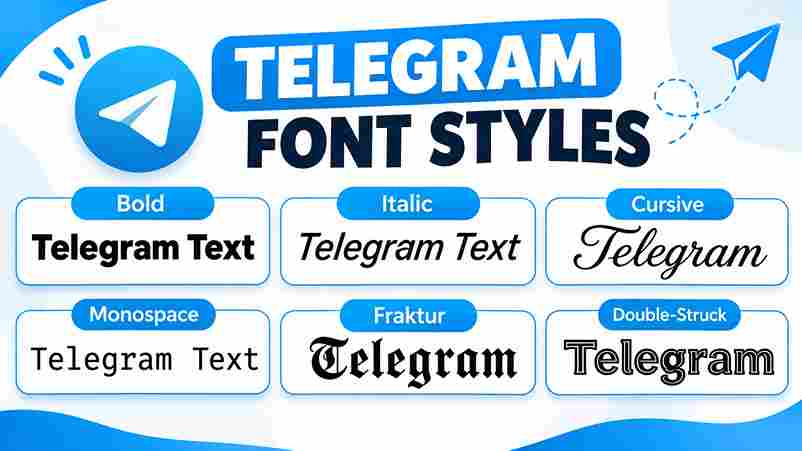
Telegram styles differ less by popularity than by readability: Cursive suits personal introductions, Monospace organizes technical details, and Bold Italic adds emphasis. For distinctive profile identities, Gothic, Double Struck, and Vaporwave create contrasting visual moods.
Decorative choices like Bubbles, Boxed, Shadow Text, and Zalgo can enliven a Telegram Bio, yet readability matters. Test Superscript, Underline, and Strikethrough before sharing; some variants display unevenly across devices or complicate searching for names.
Telegram Formatting Options
Most Telegram users overlook built-in formatting because decorative text often looks more distinctive. Yet selecting a phrase in a chat gives practical options: bold, italic, spoiler (hidden) text, and inline code without changing original characters.
For bots, MarkdownV2 controls structured message formatting, including preformatted blocks. By contrast, Unicode font variants remain visible in display names and bio fields; I generally favor native styling for readable conversations and Unicode sparingly elsewhere.
Also Read: Telegram Text FormattingTelegram Already Has Built-In Formatting (Here’s the Honest Part)
Telegram hardly needs external tools for everyday emphasis. Select text in the official app, then apply Bold, Italic, or a spoiler. In practice, in-app styling keeps important group announcements readable and avoids unnecessary character substitutions.
The distinction matters elsewhere: message bodies accept formatting, while channel title fields rely on plain characters or Unicode font generators for decoration. For important updates, straightforward styling generally protects clarity across different supported Telegram clients.
Unicode Variants vs Telegram MarkdownV2 Native Formatting
Surprisingly, bot menu buttons, folder names, and channel and group names expose MarkdownV2’s limits. Unicode variants can decorate these fields without markup parsing, although stylized characters sometimes complicate searching, pronunciation, and accessibility across older devices.
By contrast, standard messages benefit from native MarkdownV2: emphasis remains easy to edit, and ordinary characters stay readable. I recommend decoration sparingly for personal profiles, since copying decorative letters can obstruct searching and reliable indexing.
Bold
Telegram Bold text draws special attention when you highlight specific text, not entire conversations. Respect Community Rules: repeated emphasis feels promotional, while selective bolding makes urgent updates easier to scan especially within crowded public conversations.
For a bold name, use Sans Bold letterforms through a tool, then copy-paste into your profile name. Unlike native chat formatting, decorative glyphs can impair discoverability and readability; preview results across popular phones and desktops.
What Is Telegram Bold Text?
Bold text in Telegram is less about decoration than directing attention. Unlike imported letter shapes, the app’s formatting highlights an urgent detail without replacing underlying characters, making everyday announcements noticeably clearer for busy, distracted readers.
Where markdown is stripped, including certain public display fields, the Mathematical Bold block supplies a visually bold alternative. Distinct glyphs persist after pasting, although legibility and device support deserve closer scrutiny before publication and reuse.
Also Read: Twitter Font Generator: Bold MagicWhat Is the Importance of Bold Text in Telegram?
Readers rarely revisit long channel post updates. Within pinned posts, emphasize deadlines and calls to action sparingly; constant highlighting loses impact. This practical habit helps professional brand communication across busy chats when distracted subscribers skim.
Bold alone cannot fix vague writing. Keep plain text readable, retain accessibility, and prioritize screen readers when testing. Unlike decorative Unicode fonts, Telegram’s built-in formatting generally preserves ordinary characters for copying and searching in practice.
How To Generate Bold Text For Telegram?
Telegram’s native editor usually beats a generator for ordinary chat: select your words and choose Bold, or surround them with double asterisks. That keeps emphasis searchable without replacing letters with Unicode lookalikes in most chats.
For profile names, generate bold letters through mathematical alphanumeric blocks, then copy the result and paste it into your display name. Check the preview; decorative Unicode may render inconsistently, and your @handle remains tightly restricted.
Telegram Name Styles & Ideas
Less decoration often makes a stronger Telegram name. For gaming communities, pair Fraktur with ⚡; for small businesses, keep Latin letters readable. A distinctive profile benefits when its identity remains recognizable in busy public groups.
Try script for a creator’s stylish display name, or bubble letters for playful channel titles. Keep the @username in ordinary letters, numbers, and underscores; handles need predictable characters for reliable public discovery on every device.
What Is Telegram Name Style And How To Use It?
A good Telegram name is not necessarily flashy. Decorated name styles combine Unicode letters and symbols to personalize your Telegram profile without changing its underlying account identity. Readability still matters far more than extra ornament.
For a practical test, type your text into a generator, pick a readable version, Copy it, and paste within Telegram Settings’ first/last name fields. Public @usernames accept only standard Latin letters, digits, and underscores instead.
Why Do We Need a Stylish Name for Telegram?
A stylish name isn’t essential on Telegram, but it can make similar names easier to distinguish in busy profiles. For creators, a restrained symbol on each side adds personality without obscuring who they really are.
For channel owners, recognition matters more than decoration. A readable Telegram name style gives memorable titles visual consistency in the chat list, while a plain-text bio explains the community clearly without confusing potential new subscribers.
Where It Works on Telegram
Beyond ordinary chats, stylised glyphs can appear in profile names, a channel/group name, personal brand bios, sticker pack descriptions, and poll questions, where native markdown may be unavailable. I keep these decorations readable on Telegram.
In direct messages, pinned message text, and bot descriptions, Unicode designs can stay visible after pasting, although rendering varies. An @username handle cannot contain decorative Unicode; prioritize plain-text keywords for Telegram search and assistive technology.
When to Use Unicode Instead of MarkdownV2
Choose styled Unicode text for profile bio / About fields when markup cannot apply. Telegram displays as-is these characters, so decorative square letters survive copying, although Unicode blocks may render unevenly on some older devices.
For Bot API updates, MarkdownV2 handles reliable emphasis and code formatting; Unicode is better for a styled string with no markdown equivalent. Test third-party clients, and keep searchable identifiers readable using ordinary letters in practice.
How Can I Generate Font Style for Telegram Profile?
Instead of decorating everything, enter your name into a simple generator and preview stylish fonts. Compare script style with BoldSans, then copy and paste the clearest readable result into Telegram’s profile display name or bio.
For a gaming profile, try Wings ★彡; for professional branding, keep emojis subtle. Open Telegram Settings, edit your display name, and test readability on Android and iOS before saving; your @handle accepts only limited characters.
What Are the Stylish Fonts for Telegram?
Stylish Telegram text isn’t one font: Mathematical Script gives creative channel names a cursive look, while Mathematical Monospace block supplies a fixed-width typeface for technical tags. Neither changes Telegram’s underlying interface font or @handle restrictions.
For a clearer profile, italic letters suit short descriptions; enclosed alphanumeric characters add visual punch to announcement posts. In horror communities, blackletter creates a gothic look, but reserve symbols for display names, not searchable handles.
Symbols & Emojis for Telegram
On Telegram, restraint usually beats decoration: one themed emoji beside a title can establish context faster than a wall of icons. For poll titles, prioritize legibility; decorative glyph choices sometimes render inconsistently across older devices.
In practice, clan names benefit from compact symbol combinations, while meme communities tolerate more playful palettes. Before publishing, compare how custom emoji alternatives appear across different devices and Telegram clients; compatibility matters more than decoration.
Italic
Native italic is often the better choice for subtle emphasis in chats and posts. For a quoted thought or gentle correction, select and choose the built-in formatting instead of replacing every letter with decorative symbols.
Copied italic-looking Unicode can suit display names, but it may complicate searching or screen readers. In bot automation, legacy Markdown and markdown dialects differ; check supported tags before publishing an emphasized sentence across Telegram clients.
Script
Script lettering adds a handwritten aesthetic to Telegram display names, but it is not a change to the default font. Decorative glyphs typically come from Unicode mathematical alphanumeric blocks, not custom typeface downloads or plugins.
For script episode titles and italic taglines, keep the lettering brief. Check your chosen design on Telegram Desktop and older Android builds; language support differs, making elegant lettering harder to read in lengthy public announcements.
Monospace
Fixed-width lettering earns its place in Telegram when precision matters. Experienced bot developers can align command references, and monospace product codes stay legible beside prices. Decorative alternatives rarely preserve such visual order in compact conversations.
For detailed instructions, choose native code formatting rather than imitation Unicode. I prefer monospace labels for examples, but ordinary menu labels for navigation; backticks are mainly relevant to bot markup, not every regular chat composer.
Bubble and Square
Bubble lettering feels playful, but Square characters often read better in compact Telegram bios. Both rely on enclosed alphanumerics, not installed fonts; test a short sample before committing to mixed-style output across different public profiles.
On modern devices, rounded letters usually display clearly, while an old device may show a box for an unusual character. Keep standard Unicode options nearby, and check search behavior before styling a public channel name.
Fraktur
Fraktur gives a Medieval edge to a decorated name style, but the effect works best as a short, memorable accent. For gaming communities, I generally favor readable initials over an entire announcement in ornate lettering.
These are real characters, not an installed font file, so they survive copying between ordinary Telegram chats. Compare mobile and desktop views carefully before publishing; intricate strokes can obscure letters, especially in compact profile names.
Double-Struck
Unlike Fraktur, double-struck lettering carries a crisp, almost academic feel rooted in mathematical notation. Use it for a distinctive personal brand label or curated newsletter channels, where restrained emphasis can distinguish titles without overwhelming readers.
A polished preview means little when characters become unreadable boxes. Test digits, spacing, and widely supported letters on two platforms; keep essential details in plain-text summaries so followers can read them regardless of their device.
Best Practices for Styled Telegram Text
More decoration rarely improves engagement. Keep group rules readable, match the tone expected by members, and preserve plain Latin keywords for Telegram search. Check legibility with assistive tools before posting announcements on several screen sizes.
Decorative names are not automatically safe: Telegram restricts characters in handles, and rendering varies across devices. Avoid attempts to impersonate other users or evade moderation; follow community policies instead, especially when managing large public groups.
Use Cases for Telegram Creators and Brands
For creators, a recognizable Brand look depends more on consistency than decoration. Use styled text for launch updates, add decorative marks sparingly, and keep subscribe prompts readable so audiences recognize important announcements immediately across devices.
For community managers, reliable bot interfaces matter more than flashy names. Keep option labels brief, maintain uniform descriptions, and test a primary variant before publishing; unusual symbols can reduce clarity on some older mobile screens.
Bottom Line
A polished profile is usually less decorative than expected. Reserve one style per surface for emphasis, because raw Unicode code points can complicate search indexes. Prioritize legibility before visual novelty or intricate ornamentation on Telegram.
For actual conversations, use Telegram’s bold/italic formatting when possible; it is more predictable than plain Unicode text substitutions. Check each Telegram client, and remember a styled username cannot replace your registered @handle in your profile.
Is The Telegram Font Generator Free?
Yes, the Telegram Font Generator is free to use, with no sign-up required. Create decorative profile names without installing software, but preview your results carefully because some Unicode characters appear differently across devices and apps.
Will The Fonts Show Up For Everyone / Render The Same On Every Device?
Not always. Telegram renders Unicode natively, but characters may look different on Android, iOS, and macOS because each default system font varies. Check uncommon symbols carefully first; perfect compatibility is never guaranteed across all devices.
How Do I Copy and Paste Fonts into Telegram?
Select fancy text in the generator and copy it, then tap a Telegram chat or profile field to paste. Before sending, check whether decorative characters remain readable; some devices render them differently, especially older phones.
Can I Make My Telegram Name Bold?
Telegram display names can appear bold through stylish fonts created with Unicode letters; @handles cannot. Unlike message formatting, a name font style generator changes characters themselves. Test readability before using a stylish name on Telegram.
Does the Styled Username Work for My @handle?
Fancy styled text cannot become your Telegram @handle: only Latin letters, digits, and underscores are accepted. For reliable discovery, keep that handle readable; apply a creative visual style to your personal Telegram display name instead.