

PUBG Font Generator
Create stylish PUBG nicknames, explore cool Unicode text, add gaming symbols, and copy your favorite name in seconds.
Choose Your Style
Filter your nickname designsGenerated PUBG Fonts
Gaming Symbols & Decorations
Tap a symbol to add it to your nameYour name is the first thing other players notice, and unique names built from stylish Unicode text make gaming profiles feel personal. A PUBG font generator swaps characters instantly, with no font file ever required.
I once pasted a glitch nickname into the Rename Card field and watched letters vanish silently; 14 characters is the ceiling. Always run a chat test first, since copy-paste results differ across phones and tablets.
Table of Contents
What Are PUBG Fonts?
PUBG fonts are Unicode characters arranged to give an ordinary username a distinctive gaming identity. A generator converts plain letters into alternative letterforms, so each character carries its shape when pasted into the game’s name field, rather than installing a traditional font.
In practice, these designs combine bold, gothic, script, or small caps characters with decorative marks and symbols. They can create a unique nickname, but not every character accepted by one device or version will work consistently elsewhere.
How PUBG Fonts Work
PUBG fonts use Unicode characters to turn ordinary letters into stylish text without installing a traditional font. Type your name, compare each design side by side, and choose bold, small caps, script, gothic, or decorative characters.
The generator creates already-styled text for a PUBG name, nickname, or clan name. Tap copy and paste into the name field, but remember the character limit: some symbols count separately, and unsupported characters may disappear in-game.
How To Use The PUBG Font Generator
Enter your PUBG name or username using plain letters, then browse the available stylish fonts until one fits your identity. I recommend checking the preview beside your original text before choosing a decorative design.
After selecting a style, use the Copy button and paste the result into the PUBG name field. Count every visible character, including symbols and spaces, because the game may reject names exceeding 14 characters without explaining which characters disappeared.
Also Read: COD Name Generator – Create Epic Gamer Names Free
Type Your Text / Type Your Name
Start by entering your nickname or actual username in the generator’s text box. I usually begin with a plain version, check the spelling, and then compare several gaming text styles before choosing anything for PUBG.
Keep the first draft short because the character limit includes many symbols, spaces, and bracket characters. A quick preview helps identify unsupported letters before you copy the finished name into PUBG’s name field.
Pick a Style
Start with your PUBG Fonts preview rather than committing immediately to the rename field. Compare small caps, bold, gothic, script, and Fancy Fonts beside your plain username, then choose the option that keeps your identity clear.
I usually test Gaming Fonts with a short nickname, because heavy decoration can reduce readable visibility in the kill-feed size. A balanced Clan Fonts design often looks stronger than an elaborate style that becomes visual noise during elimination.
Copy & Paste / Copy It, Then Count It
Once your PUBG name looks right, use the generator’s Copy button and paste the complete string into the name field. Count every letter, space, bracket, and symbol before confirming the rename.
I always test the pasted result in chat first, because Unicode characters may be dropped silently. If the saved nickname is shorter, compare it with the original, remove unsupported styling, and avoid spending 180 UC twice.
Where Can You Use PUBG Fonts? / Where PUBG Styled Names Appear
Your styled name first matters in the lobby, where teammates and squad-fills see whether it remains readable before the match begins. I also check the pre-match screen because full styling can look different there.
During an elimination, the kill feed gives your name minimal space beside the knocked player. Later, the leaderboard and profile preserve that identity, while clan listings and other players notice it when competing or checking your stats.
In the Kill Feed
The kill feed compresses every username into a fast visual update, so bold or small caps styling can improve recognition during combat. A short nickname with readable symbols works better than excessive decoration.
I have found that supported characters remain clearest when teammates scan eliminations quickly. Before using a Rename Card, test the complete name, because dropped characters can make the displayed identity confusing or incomplete.
In the Lobby
A lobby preview is where your styled username meets real players, not a generator. I check how PUBG renders it beside nearby players, because the smallest text can expose spacing, missing letters, or awkward symbols.
An elaborate design may look impressive alone yet become difficult to recognise when teammates scan the lobby quickly. Test the complete name there before spending a Rename Card, especially when readability matters more than decoration.
On the Leaderboard and Your Profile
A leaderboard name needs clarity before decoration. From my testing, Unicode styles may display differently across PUBG Mobile, phones, and computers; check the finished username in your profile before spending a Rename Card.
A styled username can strengthen your gaming identity when the display name remains readable. Heavy symbols, small caps, or gothic characters may become characters missing in the leaderboard, leaving a shorter saved name than expected.
As Part of Your Clan’s Identity
A clan name should work beyond the lobby: it needs readable Clan Fonts, a consistent clan tag, and enough space for every member. I usually test bold designs first, then compare them with the 14 characters limit before committing.
Your team name can signal discipline without becoming difficult to recognise. Use Unicode selectively, check supported characters, and preview the final gaming profile on another device. A practical motto may carry more identity than excessive decoration, especially when the clan leaders want consistent branding.
Popular PUBG Font Styles
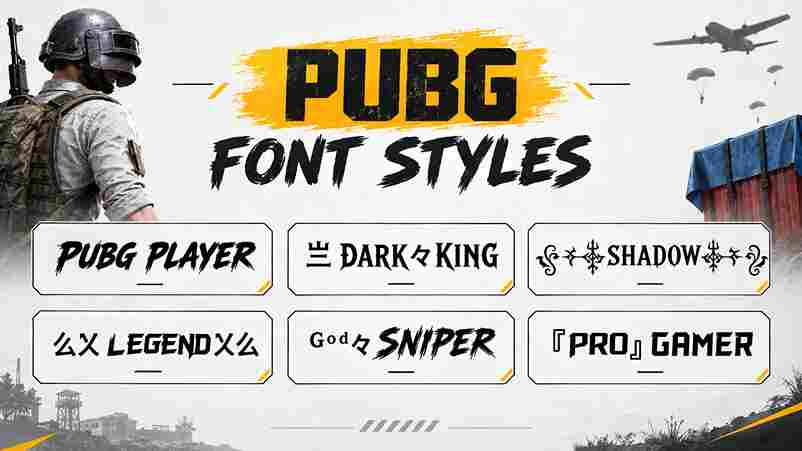
In my testing, gothic, script, and small caps create the strongest gaming identity without overwhelming a short nickname. A restrained bold look usually remains more readable across the lobby and kill feed.
For decorative profiles, strikethrough, superscript, ornamental symbols, and mixed-script designs offer variety, but supported characters matter. Test each style in PUBG Mobile before spending a Rename Card.
Rename Card / Changing Your PUBG Name
Before spending a Rename Card, I check the complete name field in PUBG Mobile by using copy and paste from the generator, then review the character limit, spelling, and supported symbols.
Open your profile, tap the edit icon, clear the username, and paste the tested design. Confirm only after the Name cannot exceed 14 characters warning disappears; otherwise, shorten the nickname and test again.
Name Rules, Character Limits & Compatibility
In my live-account checks, a PUBG nickname worked best when treated as plain text first. Unicode characters, symbols, and spaces can consume the 14 characters available, while unsupported marks may be rejected or dropped silently without warning.
Before spending UC, paste the complete name into in-game chat, ask a friend to check it, then compare the name field on your device. Results can differ between iPhone and Android, because compatibility depends on supported characters.
Which PUBG Fonts Actually Work — What We Tested
I tested ꜱᴍᴀʟʟ ᴄᴀᴘꜱ, 𝗛𝗲𝗹𝗹𝗼, 𝓗𝓮𝓵𝓵𝓸, 𝔊𝔬𝔱𝔥𝔦𝔠, ᵐⁱⁿⁱᵐᵃˡ, 『 』, and ⚜ on one live account using a phone keyboard and standard copy and paste. The results varied by device, field, and update.
The reliable method was simple: type your name, generate several Unicode characters, then paste the complete string into the rename field and test it in team chat. ꧁꧂, 彡, 乂, and ツ sometimes worked, while decorative combinations could disappear silently.
Test Results
On a live account, I pasted one at a time: bracket symbols, strikethrough, mixed-script, script, superscript, and ornamental symbols. Each result was checked in the name field and then reviewed in chat.
The reliable entries pasted correctly, while some showed a partial result or did not paste. A few failed silent, with no error, no warning, or empty boxes, so I would test every final name before spending UC.
Read This Before You Take the Table as Gospel
A table can show stylish names, supported characters, and character limit results, but PUBG updates may alter them. I always verify the name field, copy-paste behavior, and compatibility before spending UC.
Treat every result as practical guidance, not a promise. A test in chat can reveal letters missing, yet it remains not a guarantee that the saved username will display perfectly everywhere.
Why You See Fancy Names You Cannot Recreate
A styled username may appear perfect in a kill feed, yet fail inside your name field because selected characters depend on device support. I have seen empty boxes, missing symbols, or a shorter name after pasting.
The visible design may come from Unicode styles, not a downloadable font file. Before spending UC, copy-paste the complete text, test it in in-game chat, and remember that one device can display characters differently from another.
Also Read: PUBG Mobile
Why Use PUBG Fonts?
I use Unicode characters to give a plain PUBG name a sharper identity without installing traditional font files. Testing stylish text designs helps me compare different styles, keep a readable version, and copy favorite results directly from the browser.
The practical benefit is recognition: special symbols, compact decorative text, and a consistent gaming personality can make an in-game name easier to remember. I still check character limit, device support, and the name field before spending UC.
Are PUBG Fonts Free?
Most PUBG font generators are free: you can create styles, choose favorite designs, and copy them without downloading app or creating an account. Enter text in a browser, then use the result in your PUBG name.
The process needs no software installation; you simply enter text and copy the output. In my testing, a reputable generator is generally safe, but review permissions and avoid sites requesting unnecessary login details or downloads.
What Font Does PUBG Use in Its Logo and Interface?
PUBG’s logo uses custom-styled lettering rather than an ordinary installed typeface, while the interface relies on practical display text. The game’s visual identity combines bold structure, readable spacing, and a compact PUBG Mobile presentation.
From my testing, the logo’s lettering should not be treated as a downloadable font. A generator can create similar gothic or bold effects using Unicode styles, but the actual interface font remains controlled by the game and may render differently across devices.
Test Your PUBG Name Before Using a Rename Card
Before spending UC, paste the complete name into in-game chat and compare how it appears across your current version. This free check can reveal obvious failures, missing symbols, or spacing issues before you commit.
Chat and the rename field use separate systems, so a successful preview is not a guarantee. I still test the exact string on my device, because compatibility can change and a small difference may cost another card.
What a Failure Looks Like
A failure is usually visible before you spend a Rename Card: the name field rejects the nickname, removes symbols, or displays boxes. I test the complete string first, because unsupported devices can render characters differently.
Sometimes the paste appears successful, yet the saved shorter name loses decoration or spacing. Check the lobby, kill feed, and profile using a chat check; if styling fails there, do not commit the change.
PUBG Name Symbols, Copy-Paste List
Symbols can make a PUBG nickname instantly recognizable, but each mark may affect the character limit. A simple clan tag or single prefix usually leaves more room than a full wrap around a longer nickname, so count before saving.
My reliable method is to generate styled text first, copy it, then add symbols from a prepared symbols collection. Avoid the wrong order: adding decoration first sometimes breaks styling. Always test complete string in the rename field.
Symbol Name Formats
In my testing, symbols work best after the styled IGN, not before it. A prefix or separator can frame the name, while brackets and an accent add structure without overwhelming the readable letters.
Try ꧁ ꧂, 『 』, 彡, 乂, 々, or ツ around a plain name, then apply the chosen style. Check that each symbol is pasted correctly, because unsupported characters may disappear or leave empty wrapping.
Combining Symbols With A Styled Name
A symbol can frame a nickname without overwhelming its gaming personality. I usually test the styled text first, then add one character each side, because decorative marks may consume the character limit unexpectedly.
Try a clan initial, a bracket, or a floral mark beside readable letters, then copy and paste the result into the name field. Check the preview and kill feed before confirming, since unsupported symbols can disappear silently.
PUBG Clan Name Fonts And Character Limit
A clan name can look bold, fancy, or decorative, but the 14 characters rule still controls the final result. Count every visible letter, symbol, and spacing mark before confirming your team identity.
I recommend testing the generator with your chosen team title, then checking the personal username separately. A readable motto may use 60 characters, while the clan title remains shorter, so choose carefully before spending currency.
Can You Download PUBG Fonts?
You do not download a PUBG font file for every nickname; instead, a browser generator converts ordinary letters into supported characters. Choose a design, preview it, then copy the gaming text ready for use.
For PUBG Mobile, this approach keeps styling portable across profiles, devices, and Discord without installing software. Test the pasted name first, because some decorative characters may disappear, appear different, or exceed the game’s 14-character limit.
PUBG Fonts vs Regular Fonts
Regular font names rely on familiar plain text, while PUBG font styles replace letters with already-styled Unicode characters. That difference creates eye-catching designs without installing typefaces, although character limit checks remain essential before pasting.
In practice, I compare both versions side by side: a regular nickname offers dependable compatibility, whereas decorative styling adds personality but may fail on some devices. Test the finished PUBG name before confirming a rename.
PUBG Fonts for BGMI Players
For BGMI players, styled names depend on the same underlying name field rather than a downloaded typeface. A generator converts ordinary letters into Unicode variations, then you copy-paste the result into the rename screen for testing.
In my testing, compatibility varies by device and update. Count the 14 characters, check whether symbols remain visible, and confirm before using a Rename Card; unsupported characters may disappear without an obvious warning.
Conclusion
A PUBG font generator is most useful when treated as a practical styling tool, not a guarantee that every decorative character will survive the game’s naming rules. Type your nickname, browse available styles, copy the result, and test it carefully before spending UC on a Rename Card or committing to a clan identity.
In my experience, the best result combines readability, compatibility, and personality. Plain letters with one modest symbol usually perform better than heavily decorated designs. Check the name on your device, confirm how many characters remain, and remember that PUBG may display, remove, or reject selected Unicode characters.
What Are PUBG Fonts? / What Is the PUBG Font Generator?
PUBG fonts are Unicode-based decorative text styles that create cool names without installing typefaces. A generator transforms ordinary letters into small caps, symbols, or alternate characters for nicknames, clan names, and creative gaming names that remain copy and paste ready in PUBG Mobile.
Are PUBG Fonts Free / Is the Generator Safe?
PUBG fonts are generally free to use through a browser-based generator, letting you try as many styles without downloading an app. The tool creates Unicode text rather than installed typefaces, so avoid suspicious downloads, login requests, or external software, and test compatibility before spending UC.
Can I Use These Fonts for My PUBG Name, and Why Does My Name Show Fewer Characters Than I Pasted?
Yes, you can use styled text in a PUBG name, but each selected character may count differently. Decoration and unsupported symbols can disappear, so test your nickname before spending a Rename Card or confirming changes.
Is There A Character Limit For PUBG Names?
PUBG applies naming rules that may count symbols, styled text, and characters differently; test your nickname before using a Rename Card, because unsupported designs can disappear, trigger an error message, or exceed the allowed 14 characters.
Can I Create a Stylish PUBG Clan Name, And What Are the Clan Limits?
Yes, you can create a stylish clan name by combining a clear clan tag, readable symbols, and preset designs that suit your Crew. Check the current 60 characters limit, naming rules, and members before spending resources.