
Pixelated Text Generator – Create Cool Pixel Text Online
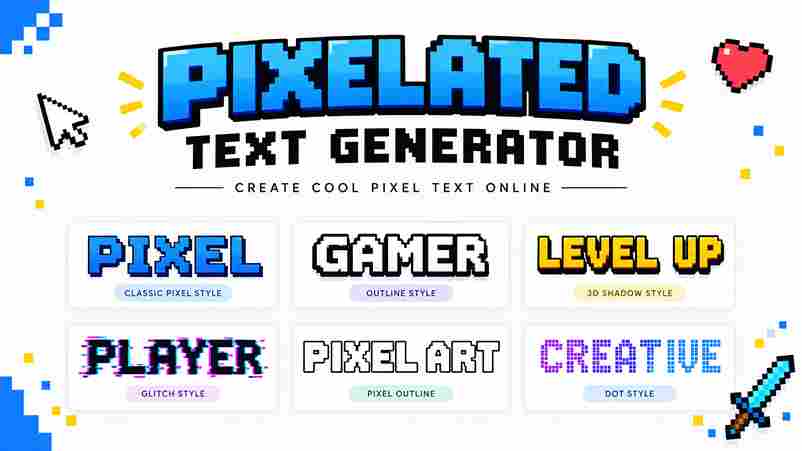
A pixelated text generator turns text graphics into deliberate pixel style compositions, placing each character pixel by pixel for clarity at a specified size. I use it when a computer screen needs readable lettering without softened edges or unnecessary smoothing. Unlike a font family download, the generator creates usable outputs immediately, supporting logos, social images, and game interfaces. Its value becomes clearest on small screen resolutions, where carefully aligned shapes preserve personality, spacing, and recognition better than ordinary type. What Are Pixel Fonts Pixel fonts are bitmap fonts built from simple blocks aligned to a pixel grid, creating sharp squares instead of elaborate curves. Their consistent format keeps text clear at small sizes, especially in retro interfaces, game art, and compact screens. Unlike regular fonts, these designs preserve perfect pixel letters through deliberate spacing and limited shapes. I find pixel fonts especially effective for UI, arcade-era visuals, gaming bios, and social media posts, where strong silhouettes matter more than typographic softness. Pixelated Text Generator Vs. Pixel Font Download A pixelated text generator produces finished lettering for game titles, retro posters, and social captions without software installations. You select a font, adjust colors, preview text effects, then save image or copy results instantly. A pixel font download suits designers building indie game UI, pixel art logos, or reusable sprites. It offers deeper control inside design software, while a generator better serves quick pixel text experiments, consistent bitmap style, and crisp exported graphics. Also Read: ASCII Generator Made Easy Pixelated Text Generator Use Cases For game branding, a pixelated text generator quickly produces pixel letters for menus, title screens, and dialogue box labels. I use multiple lines, font size, and transparent background settings to keep interface assets consistent across screens. Creators also use it for social profile names, forum posts, thumbnails, and Discord code blocks. A retro phrase can become a PNG graphic, while Unicode alternatives suit bios where image uploads are unavailable, preserving readable styling. How It Works Start by entering text into the generator, then watch the preview update in real time. I usually test short labels first, because pixel styles reveal spacing, counters, and readability before longer copy is added. Choose a variation, inspect the glyph, and adjust its pixel size until the exact pixel grid remains stable. Finally, use export for a transparent PNG, or select SVG when the artwork needs flexible scaling. Create Text Graphics With Pixel Fonts Start by choosing type your text and checking the letters at working size. I usually inspect clean edges, punctuation, and bitmap style before adjusting line spacing, because small alignment errors become obvious in compact text graphics. Next, set transparency, recolor the lettering, and export a crisp SVG when scalability matters. Keep whole-number pixel sizes enabled, then test the result against your intended background so each character retains a controlled style. Make Pixel Text in 3 Steps Start by choosing a pixel variation that matches your retro aesthetic, then type your text while watching the result as you type. I usually test short words first, because compact lettering makes spacing, contrast, and the arcade vibe easier to judge. Next, select your style, review the available 8-bit style variations, and adjust the preview until the letters remain readable. When the result feels balanced, use one click to copy it, then paste the finished text into a game bio or social profile. How To Use Pixel Font Generator Start by entering a message, then choose a pixel font library that matches your project. Test A to Z characters and 0 to 9 numbers, adjust fill, shadow, and backgrounds, then inspect the layout guide before exporting your design. I usually compare several variations while checking spacing at whole-number pixel sizes. Use resize for another canvas, invert for contrast, and PNG export when the finished lettering must remain sharp across game screens, posts, or thumbnails. Key Features A good generator should make each pixel style immediately testable, not merely displayed. I compare multiple variations against the intended retro gaming design, checking readability, spacing, and silhouette before choosing a final treatment for production. The strongest results preserve an authentic pixel style while offering an 8-bit inspired variation that suits titles, badges, and interface labels. This approach keeps the classic arcade look recognizable without forcing every project into one rigid template. Also Go: Google Fonts Generates Authentic Pixel Styles Authentic pixel styles begin with deliberate grid control, not decorative noise. I test bitmap pixel styles, pixel style variations, and 8-bit style proportions until each character retains crisp edges and readable spacing at small sizes. The strongest results balance retro fonts, Arcade 8-bit-style structure, and pixel art discipline. A carefully chosen Mario font, Zelda font, or Minecraft font can suggest its era without copying recognizable game-brand styles. Instant Preview As You Type With as you type previewing, each character appears immediately inside the selected pixel grid, so you can judge spacing, text legibility, and pixel lettering before exporting. This live response makes small edits easier to assess. I usually test short titles first, then compare pixel variation, style, and font sizes while entering longer lines. The preview reveals awkward spacing, crowded letters, and uneven edges early, helping the final pixel artwork remain clean. Copy Any Style With A Single Click A single click can preserve pixel-perfect spacing while your chosen pixel fonts remain ready for copy and paste across profiles, captions, or project notes. I test each result at practical display sizes before sharing it. The workflow keeps styled text portable: select a variation, copy it, and place it in Discord bios, Instagram bios, or other platforms without installing anything. Unicode characters carry the appearance, while apps handle the pasted result naturally. Completely Free & No Signup Needed A free Pixel Font Generator removes registration barriers, letting you test styles immediately. I can create pixel text, compare variations, and refine spacing without surrendering personal details, making quick experiments practical for everyone. Because there is no signup, the workflow stays direct: enter wording, preview the result, and … Read more